Product feed preflight · Google Merchant Center · OpenAI Stable
Product feed checker for Google Merchant Center and OpenAI
Find product feed issues, understand why, fix safely, verify. A local, evidence-backed checker for the feeds you submit to Google Merchant Center and to the OpenAI Stable product-discovery schema.
64 versioned rules across 3 rulesets · ruleset 1.0.0 · rule data verified 11 November 2026 · no account needed for a local run
What a run actually looks like
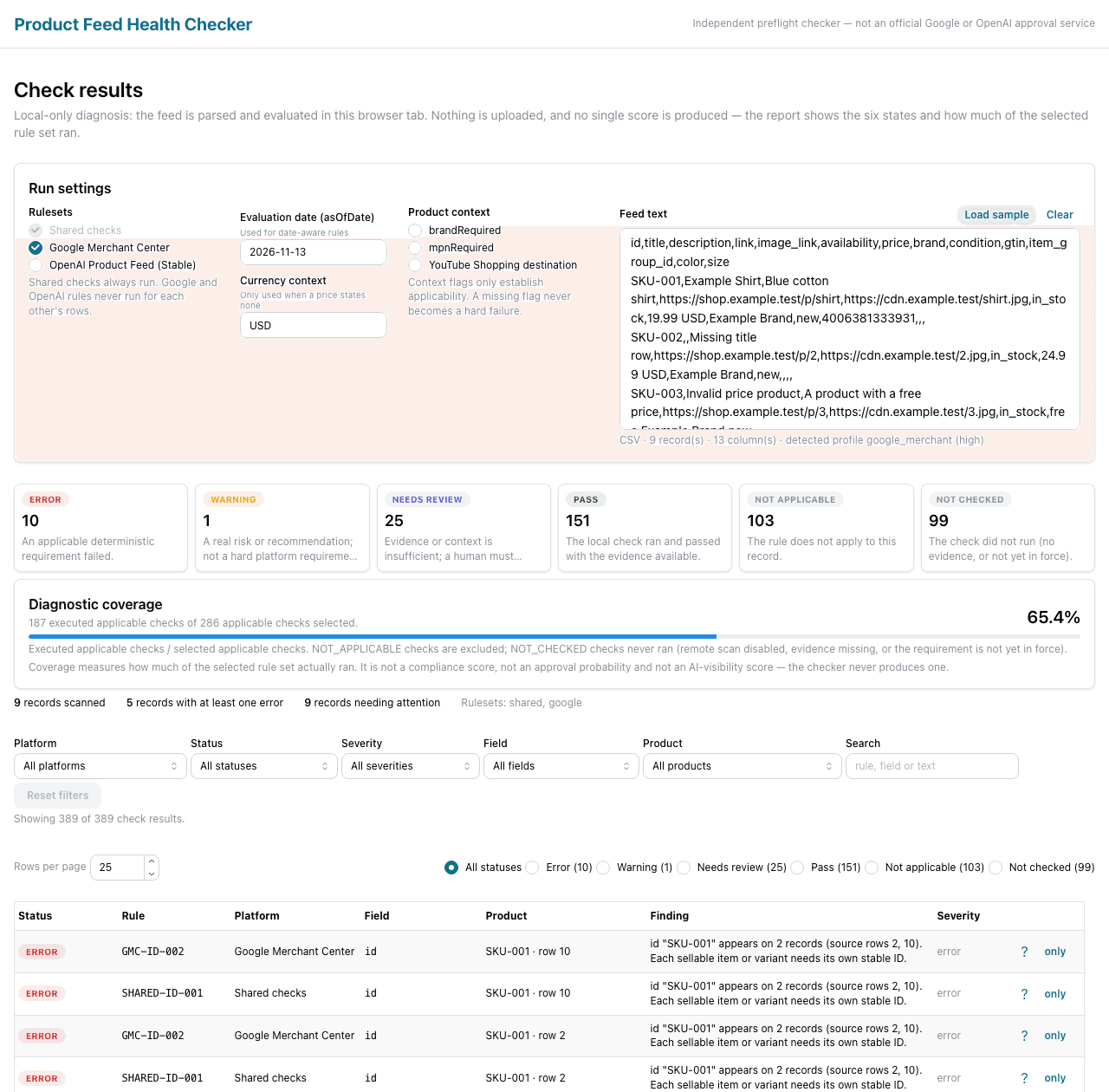
This is the checker's own results workspace, captured on 2026-11-13 at 1280×1260 after running the built-in sample feed — not a mockup, not a design comp. Six status counts, a labelled diagnostic-coverage figure instead of a score, filters, and one row per finding with its rule ID, field, product and source link.
What it found in the sample feed
Three real findings from that run, rendered from the rule registry rather than retyped. Each one names the rule, the field, the value from the file, why it matters and the official source; the fix column is the rule's own guidance, including the cases where the honest advice is “supply the real value, do not invent one”.
GMC-PRICE-001 · v1.0.0
price · SKU-003 · row 4
price "free" is not an amount with an optional currency.
Raw value
free
Fix
Provide a valid price and explicit currency.
required · as-of 2026-11-11
Official sourceGMC-BRAND-002 · v1.0.0
brand · SKU-006 · row 7
brand "N/A" is a placeholder rather than a real brand.
Raw value
N/A
Fix
Use the real brand when one exists; otherwise follow Google’s no-brand guidance for the product.
recommended · as-of 2026-11-11
Official sourceGMC-IMG-LEGACY-001 · v1.0.0
image_link · SKU-001 · row 10
Product type (clothing vs non-clothing) is not established for this record.
Raw value
(empty)
Fix
Use a source image meeting the applicable minimum dimensions; do not upscale a small image.
conditional · as-of 2026-11-11
Official sourceThe sample feed ships with the app so the first run needs no file. Its rows are synthetic; the findings are what the rules actually return for them.
Six result states, no single score
A number would let one blocking problem average itself away against passing rows. So a run reports counts per state and a labelled diagnostic coverage figure — executed applicable checks over selected applicable checks — and nothing else.
An applicable, deterministic requirement failed for this row and field.
A recommendation failed, or a future requirement is approaching.
The evidence is ambiguous — a human has to decide. Never collapsed into a pass.
The implemented local check passed with the evidence available.
The rule is known not to apply to this record.
The check did not run (for example: no remote evidence for this URL).
Rule coverage
Rules
64 versioned rules
Rulesets
3 — shared, Google, OpenAI
Ruleset version
1.0.0 (schema 1.0.0)
Last verified
11 November 2026
Shared catalog
10 rules
Parse integrity, duplicate headers, blank values, duplicate item IDs, URL syntax and credentials, money and date syntax.
Validator detailsGoogle Merchant Center
35 rules
Identifiers, titles and descriptions, links, availability, price, brand, condition, variants and the full image specification including the 2027-01-31 change.
Google rule referenceOpenAI Stable product discovery
19 rules
The nine required basic fields plus price syntax, availability values, variant context and the optional enrichment fields that are never blockers.
OpenAI rule referenceHow to check the rules yourself
- Read the methodology for how a rule is versioned, verified and superseded — and why an applicability that cannot be established becomes Needs review instead of a guessed error.
- Every rule row on Google and OpenAI pages lists its requirement type, field, outcome, official source URL and last-verified date.
- Changelog records each ruleset version and the source change that triggered it, so a difference between two reports can be attributed to the rules rather than to the file.
Registry 1.0.0 · schema 1.0.0 · rule data verified 11 November 2026 · page revised 2026-11-13.
What the checker does not do
It does not approve
There is no approval, eligibility or account-health signal in the output, and no plan can buy one. A pass means the published deterministic requirement was met with the evidence available — nothing more.
It does not submit
Nothing is uploaded to Google, OpenAI, Merchant Center or Business Hub. The file is parsed in your browser; the only remote requests are the URLs you explicitly submit to the scanner.
It does not score
No composite score, no grade, no percentage that reads like a verdict. Six explicit states and a coverage figure whose basis is printed next to it.
- It does not judge account-level configuration — target countries, shipping setup, merchant account status — because that context is not in the file.
- It does not render JavaScript-only product pages; a page that cannot be read as static HTML becomes Needs review, not a guess.
- It does not invent a GTIN, price, stock value, brand or image URL, and it never upscales an image to pass a size rule.
What it costs
Free
Import, parse, run the shared and platform rules, review findings, repair with a diff preview, export and revalidate — locally, with no sign-up and no email.
Pro
Adds opt-in remote evidence for the URLs you select — product page and image bytes — at a higher quota. Billed monthly or yearly through the payment provider's hosted checkout, where the exact amount is shown before you pay.
Prices live in the payment catalogue, so this page does not print one: a second figure here would be a stale copy of the truth. The pricing page explains what each plan includes and what a paid plan does not buy.
Frequently asked questions
Is my product feed uploaded to your servers?
No. The file is parsed and evaluated in your browser, and unmapped columns are preserved so an export stays lossless. The only network requests are the account and billing routes, plus the remote scanner for the specific URLs you choose to submit — and those requests carry URLs only, never product rows or the file.
Do I need an account to check a file?
No. Local diagnostics need no account, no email and no sign-up: import a CSV, TSV or JSONL export and read the report. An account exists only for remote evidence and for a paid plan, and sign-in is a six-digit code sent by email — there is no password.
Does a passing result mean Google or OpenAI will accept my feed?
No. The output contains no approval or eligibility signal. A pass means an applicable, deterministic, published requirement was met with the evidence available at that as-of date. Account state, policy review, category rules the file cannot establish and every final display decision stay with the platform.
Why is there no score out of 100?
Because a score hides the thing you need. One blocking item-level failure can be averaged away by hundreds of passing rows, and an abstention can be silently counted as a pass. The report gives counts per state plus diagnostic coverage — executed applicable checks over selected applicable checks — with the basis printed next to the number.
Why will it not fix every issue automatically?
Because a GTIN, a brand, a price, a stock value or an image URL cannot be derived from the file. Inventing one produces a feed that passes a checker and fails the platform. Only deterministic repairs are offered — trimming, safe normalisation, confirmed header mapping — always previewed as a cell-level diff before anything is written, and the original rows are kept.
What changes on 2027-01-31?
Google’s 500×500 pixel minimum applies to every product image from that date, and the legacy 100×100 / 250×250 split stops applying. Every run records the as-of date it used, so re-running the same file after that day can legitimately produce new failures — that is the rule changing, not the file. Between the legacy minimum and 500×500 the checker reports a warning rather than an error.
Privacy default: the file stays local
The feed is parsed in your browser. Reaching a backend is limited to the account and billing routes, plus the remote scanner for URLs you explicitly submit — and the scanner receives only those URLs, never product rows, identifiers, or the file itself. Read the privacy policy for exactly what is retained and for how long.
Start with the page that matches your problem
Google Merchant Center image checker
Check product images against the published Google Merchant Center image requirements: pixels, megapixels, file size, real file format, animated GIF and the 500×500 change on 2027-01-31.
Open Google Merchant Center image checkerProduct feed validator
Validate a product feed export locally: CSV, TSV or JSONL parsing fidelity, duplicate identifiers, URL and money syntax, then platform-specific checks with source-backed explanations.
Open Product feed validatorGoogle Merchant Center image requirements guide
Google product image requirements with the date timeline: legacy 100×100 and 250×250 minimums, the 500×500 requirement from 2027-01-31, the conflicting warning dates, the 64 MP and 16 MB limits, and how to check each one.
Open Google Merchant Center image requirements guideProduct feed errors: diagnosis and repair
How to read a product feed error, tell a blocking field failure from a recommendation, avoid inventing identifiers or prices while fixing, and confirm a repair with a controlled revalidation.
Open Product feed errors: diagnosis and repairAI commerce product feed data guide
What AI shopping surfaces actually need from product data: indexable pages, accurate machine-readable price and availability, separate crawler policies for OAI-SearchBot, GPTBot and PerplexityBot, and what no tool can promise.
Open AI commerce product feed data guide